


Your PlanetCare filter is easy to install.
Simply download the manual with all the necessary steps to get your filter up and running in no more than 10 minutes!
No professional help or extra tools required.

Hoe installeer ik het filter in 10 minuten?
Setting up your microfibre filter
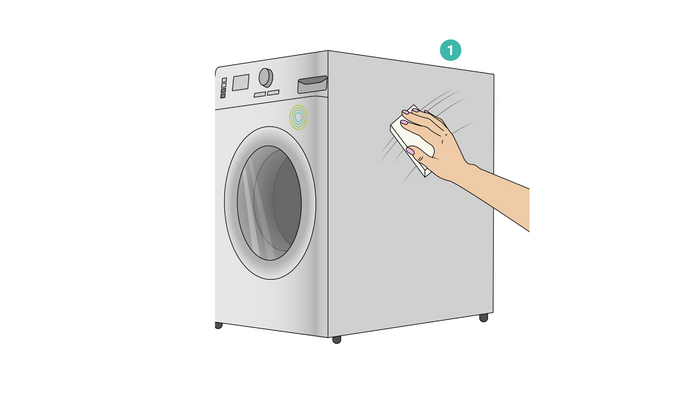
Choose a Side & Clean the Surface
Pick which side of your washing machine to mount the filter. Wipe the surface with rubbing alcohol to remove dust and grease.
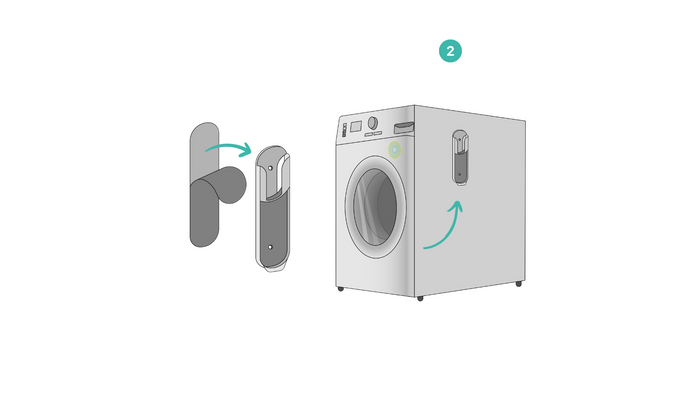
Mount the Holder & Wait 24 Hours
Stick the mounting strip (1) to the wall holder (2), then attach it to the surface. Press firmly and wait 24 hours before attaching the filter.
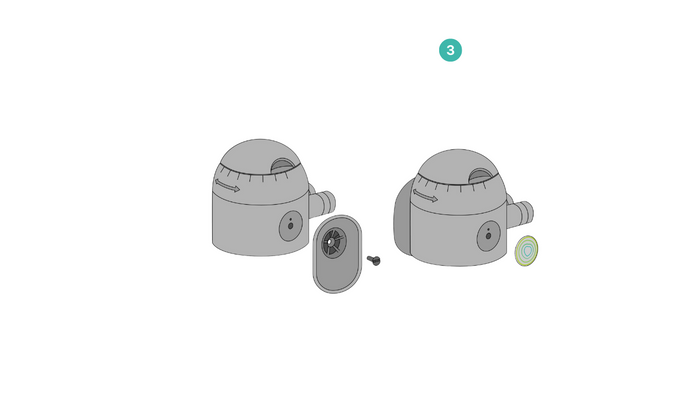
Attach the Filter Holder & Logo
Fix the filter holder (6) to the filter head (5) with a screw (8). If necessary, attach the logo (7) to the opposite side of the filter head (5). Choose left or right based on your setup. Do not tighten the screw without the holder❗
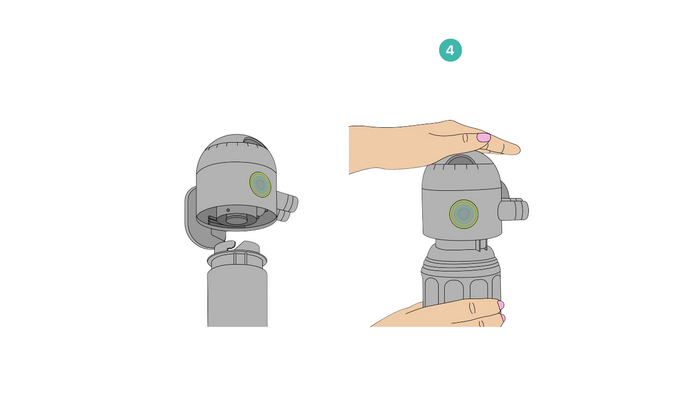
Insert the Cartridge & Close the filter
Take the assembled head & push the filter cartridge (4) in. Rotate it half a turn until it locks with a click. Attach the filter housing (3) and screw it tightly to prevent leaks.
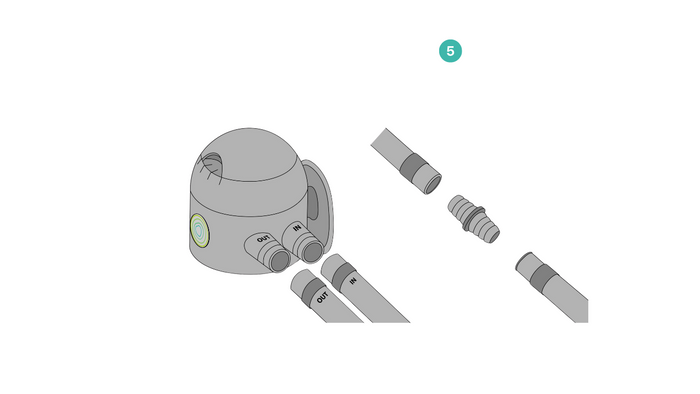
Connect the Drain Hoses
Connect the shorter drain hose (9) to the adapter (10) and attach it to your washing machine’s drain hose. Then, connect the longer hose to your drain. Check the “IN” and “OUT” markings and firmly connect it to the filter.
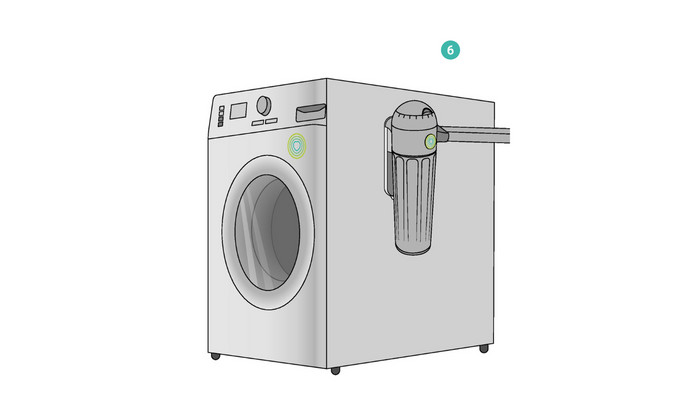
Attach the Filter (After 24 Hours)
Slide the filter into the holder until it clicks into place.
Wait 24 hours after mounting the holder before you attach the filter.

Hoe vervang ik de cartridge?

Understanding BYPASS and cartridge replacement indicator
This filter is equipped with an automatic bypass that activates when the cartridge reaches full capacity. When the handle is in raised position, it serves as a visual indicator that it is time to replace the cartridge. The bypass can also be triggered manually when washing clothes made from natural materials.
💡 Tip: Extend Cartridge Life
Washing 100% natural fiber clothes? Push the by-pass button up to skip filtering and make your cartridge last longer.
The setting ring
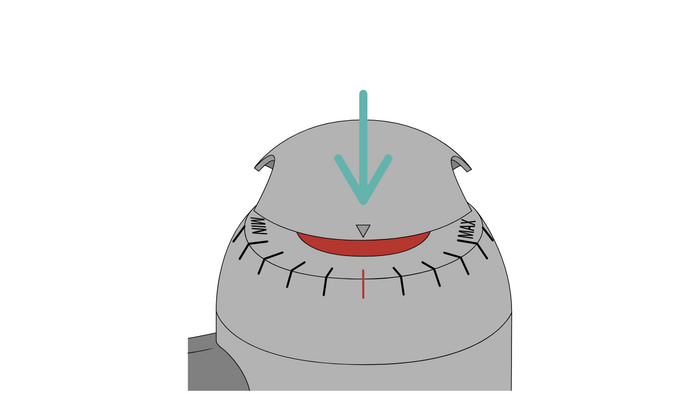
Setting ring
PlanetCare 2.0 has a setting ring that adjusts the sensitivity of the automatic bypass. The ring is factory set to the middle (neutral) position.
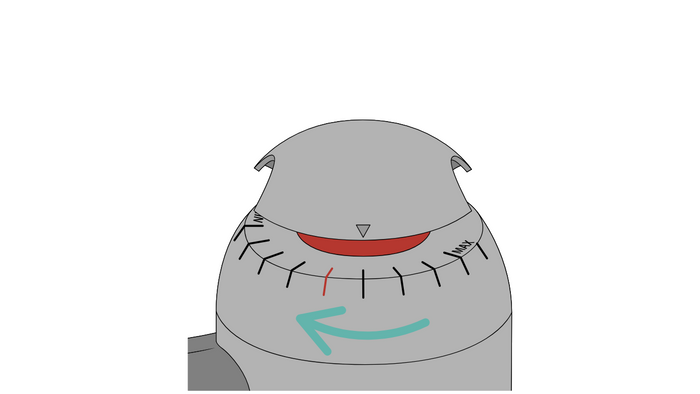
Factory setting is TOO WEAK
HOW TO FIX IT? Turn the adjustment wheel one line towards the MAX indicator (turn to the left). Repeat this until you see an increase in filter cartridge durability. If your machine begins to have difficulty in pumping water (error message on washing machine), turn the wheel back one line towards the MIN indicator.

Factory setting is TOO STRONG
HOW TO FIX IT? If the bypass indicator doesn't activate automatically after the cartridge is full, the factory setting is too strong. This may lead to wet clothes or difficulty in pumping water (error message on washing machine). Turn the adjustment wheel one line towards the MIN indicator (to the right), and repeat until the bypass starts activating automatically for smooth operation (properly drained clothes and no error messages on the washing machine).

Hoe kunt u uw filter perfect afstellen?
Onze Chief Science Officer dr. Andrej Kržan legt uit hoe u uw PlanetCare 2.0-filter nauwkeurig kunt afstellen.